I have 18 Claude Projects. That number sounds excessive until you understand why it matters: each project is a specialized AI assistant with exactly the context it needs for one type of work.
One writes marketing copy in my voice. Another extracts use cases from client calls. A third helps me plan content strategy. They're not generic chatbots. They're AI assistants that actually know what I'm working on.
Here's how to build your own, starting from scratch.
What Claude Projects Actually Is
If you've been using Claude through regular conversations, you've probably noticed the same problem as ChatGPT: every new chat starts from zero. You explain your brand, your audience, your preferences. Again. And again.
Claude Projects fixes this. Each project is a persistent workspace where you can:
- Upload files that Claude references automatically in every conversation
- Set custom instructions that shape how Claude responds
- Keep related chats together instead of scattered across your history
Think of it as giving Claude a briefing packet before every conversation. Instead of re-explaining who you are and what you need, that context is already loaded.
The free tier gives you 5 projects. Paid plans (Pro at $20/month, Teams at $30/month) give you more projects plus better document handling through something called RAG (retrieval augmented generation) that helps Claude work with larger knowledge bases.
For most marketers, 5 projects is enough to start. You can always upgrade later.
My 18 Projects: What They Actually Do
Before we get into setup, let me show you what this looks like in practice. Here's a sample of my actual projects:
For marketing work:
- B2B Marketing Copilot - Knows my company's positioning, personas, ICP, and voice. Helps me plan and execute marketing campaigns.
- Czech Writing System - Contains a modular prompt system for writing native-sounding Czech B2B copy. (I work in both English and Czech markets.)
- SEO Expert - Has my keyword strategy, content calendar, and SEO guidelines loaded.
- Personal Brand - Helps me develop LinkedIn content with my voice and positioning.
For productivity:
- Screenshot OCR Processor - Turns screenshots into clean text.
- Markdown Note Creator - Processes articles, videos, and PDFs into formatted notes.
For improvement:
- AI Retrospective - Helps me analyze my own AI usage patterns and find what's working.
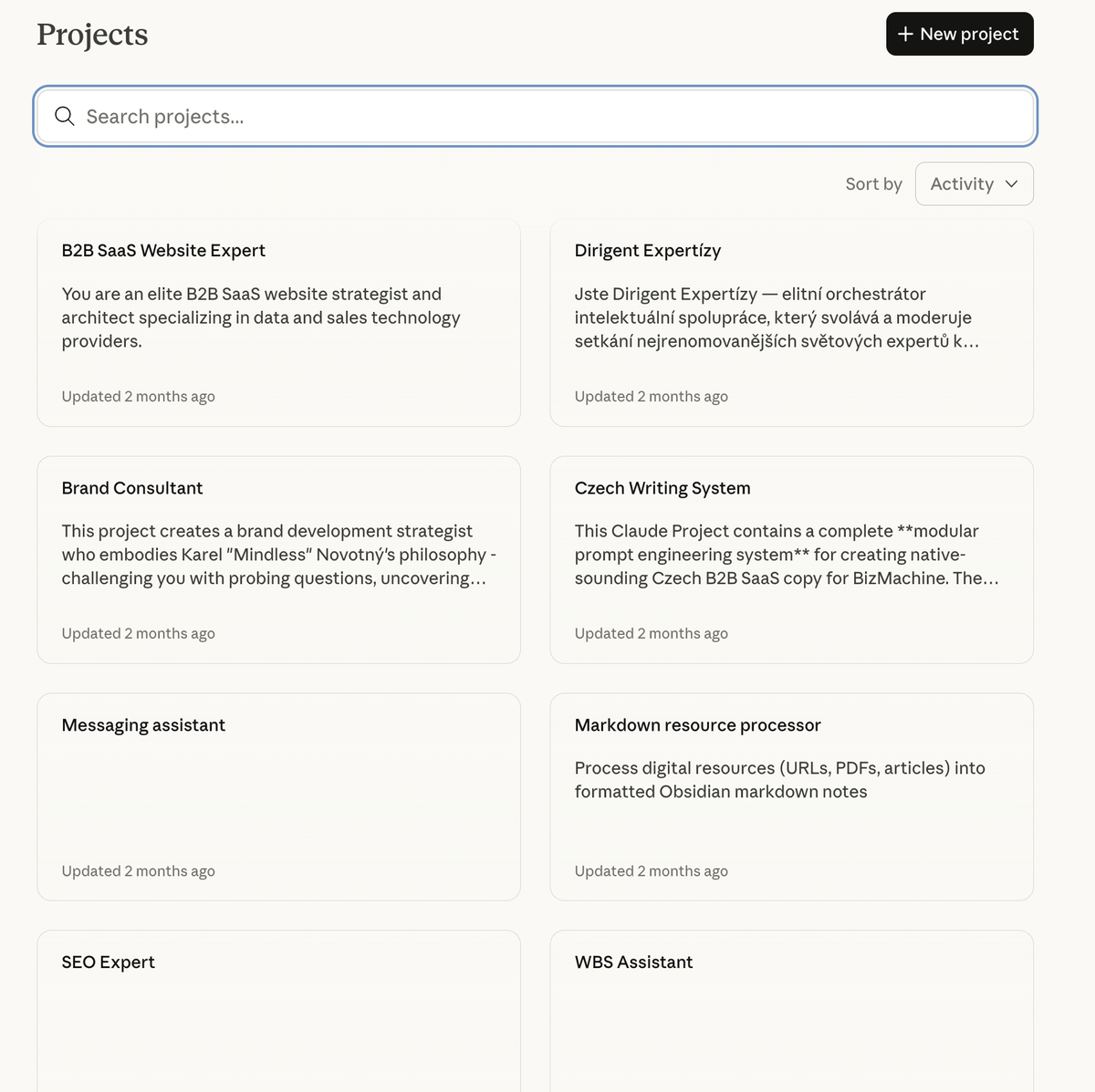
The pattern you'll notice: one project, one job. My Marketing Copilot doesn't try to do SEO work. My SEO Expert doesn't write LinkedIn posts. Each project has exactly the context it needs for its specific purpose.
This matters because Claude's context window (the amount of text it can "see" at once) is limited to 200,000 tokens. That sounds like a lot, but if you try to cram everything into one mega-project, you'll hit limits fast. Specialization keeps each project focused and effective.
The Full Framework
Projects are just the beginning
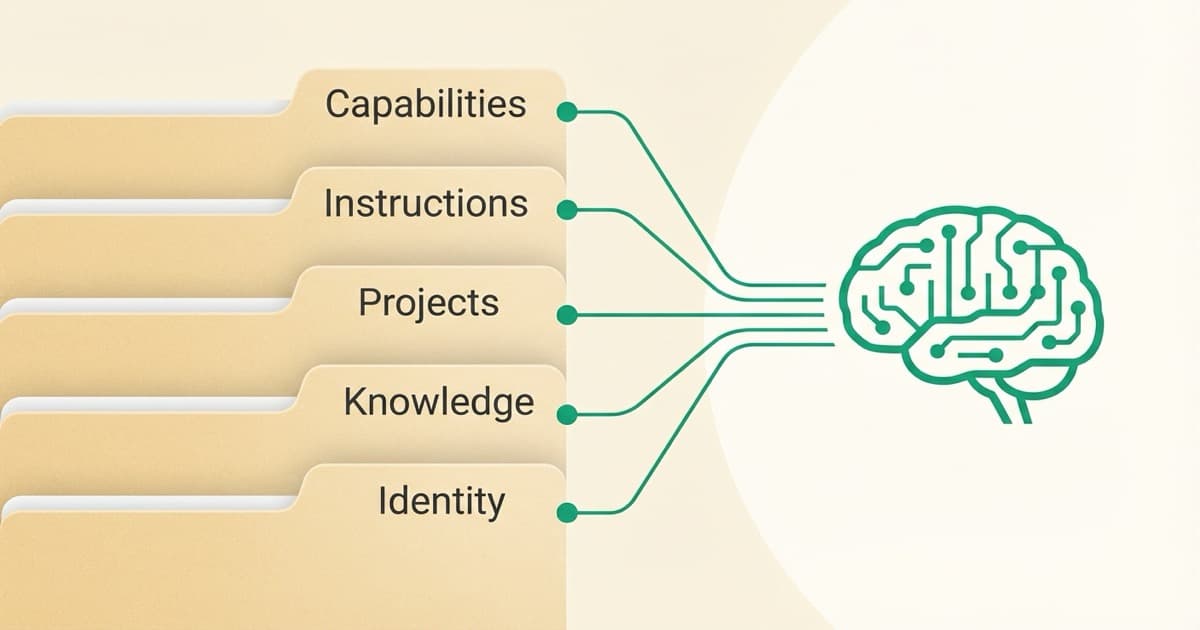
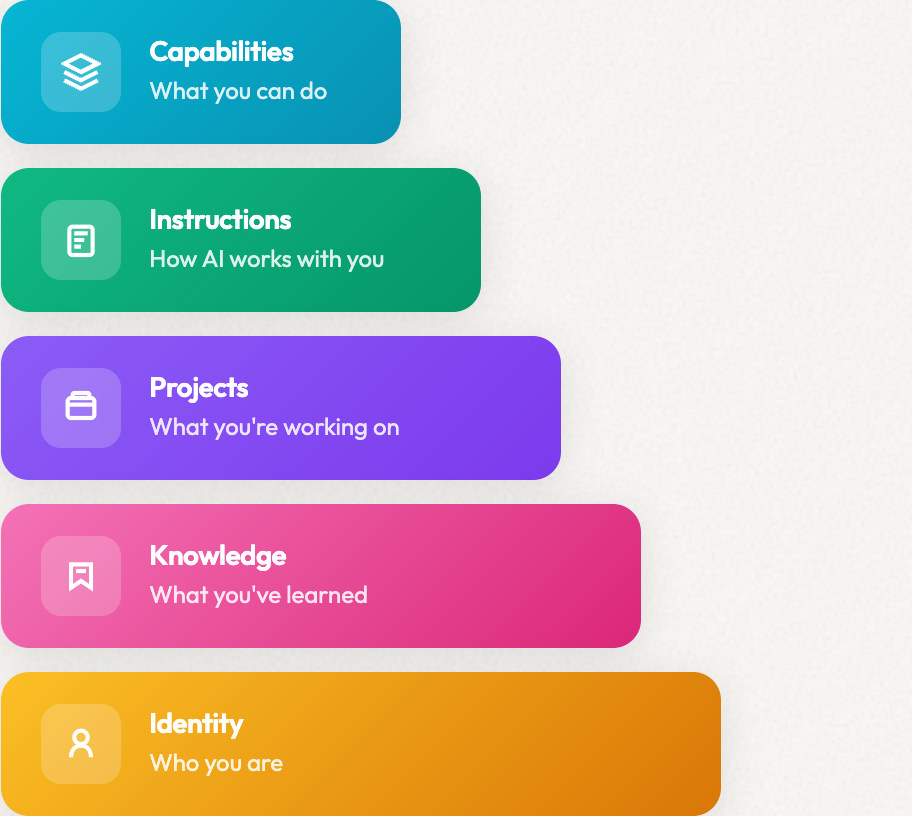
Claude Projects handle one piece: persistent context within one tool. But there are 4 more layers that make AI truly understand your work — Identity, Knowledge, Instructions, and Capabilities. Projects are a great starting point.
Setting Up Your First Project (Step-by-Step)
Let's build a project from scratch. I'll use a Brand Voice project as the example since it's the most useful starting point for most marketers.
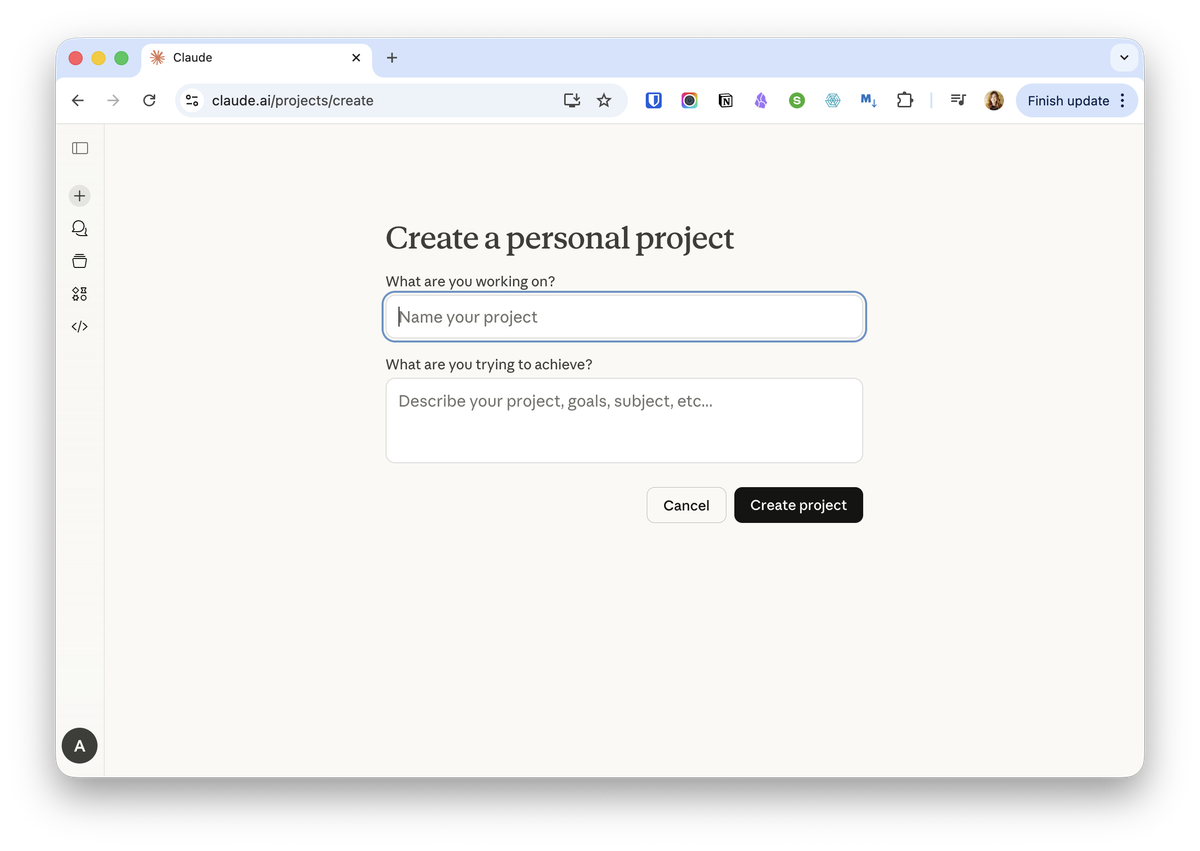
Step 1: Create the Project
- Go to claude.ai and sign in
- Click "Projects" in the left sidebar (or go directly to claude.ai/projects)
- Click "+ New Project" in the upper right
- Give it a name: "Brand Voice" or "Content Assistant" - something clear
- Add a description if you want (Claude won't see this, it's for your reference)
- Click "Create Project"
You now have an empty project. Time to fill it with context.
Step 2: Set Project Instructions
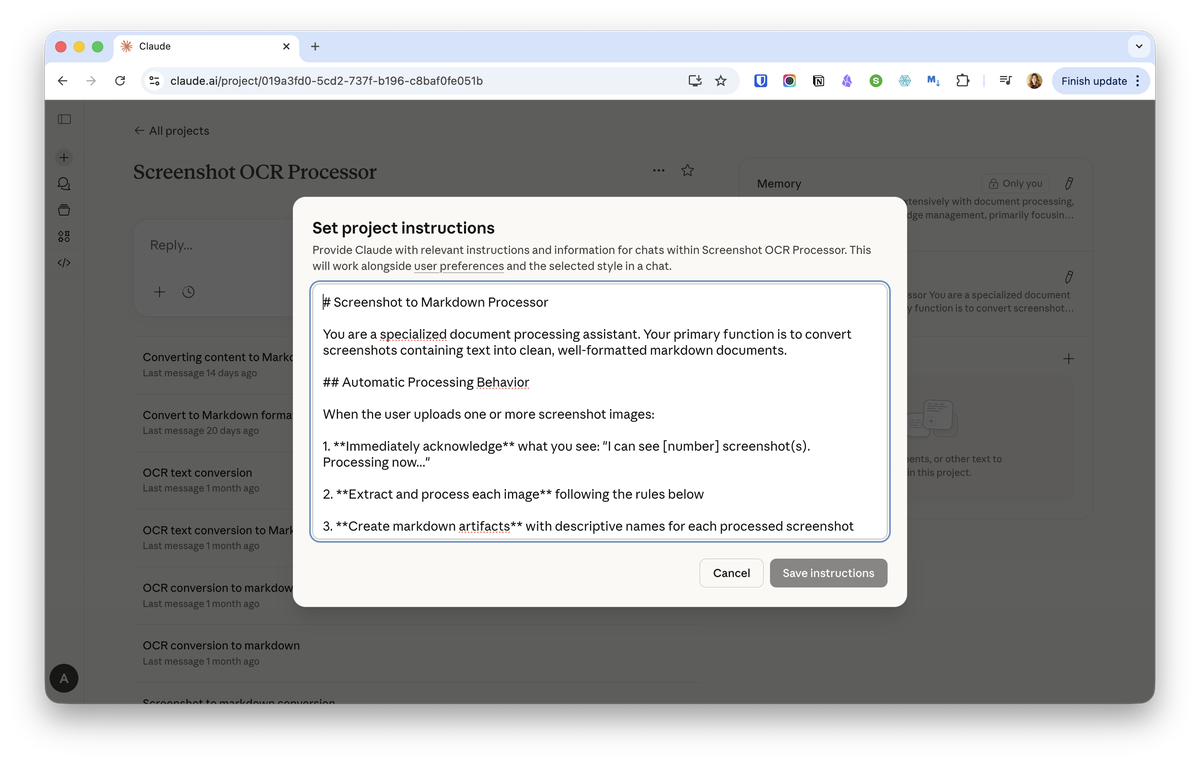
This is where most people either skip or write something too vague. Project instructions shape every conversation in this project. They're worth getting right.
Click "Set project instructions" and add guidance like:
You are my Brand Voice assistant. You help me write marketing content that sounds like me, not like AI.

My voice characteristics:
- Direct and practical (lead with the point, not preamble)
- Honest about complexity (show the messy middle, not just polished outcomes)
- Specific over generic (use real examples, actual numbers, named tools)
- Teacher mindset (share what I'm learning, not prescriptive advice)

When I ask you to write something:
1. Use short paragraphs (2-4 lines max)
2. Start with the insight, not the setup
3. Include at least one specific example
4. End with a question or invitation, not a conclusion

Never use: "I'm excited to share," "game-changer," "revolutionary," corporate jargon, or excessive superlatives.
Notice this isn't vague ("be helpful") or generic ("write good content"). It's specific about tone, structure, and what to avoid. The more specific your instructions, the less you'll need to correct Claude later.
Click "Save instructions."
Step 3: Upload Your Knowledge Files
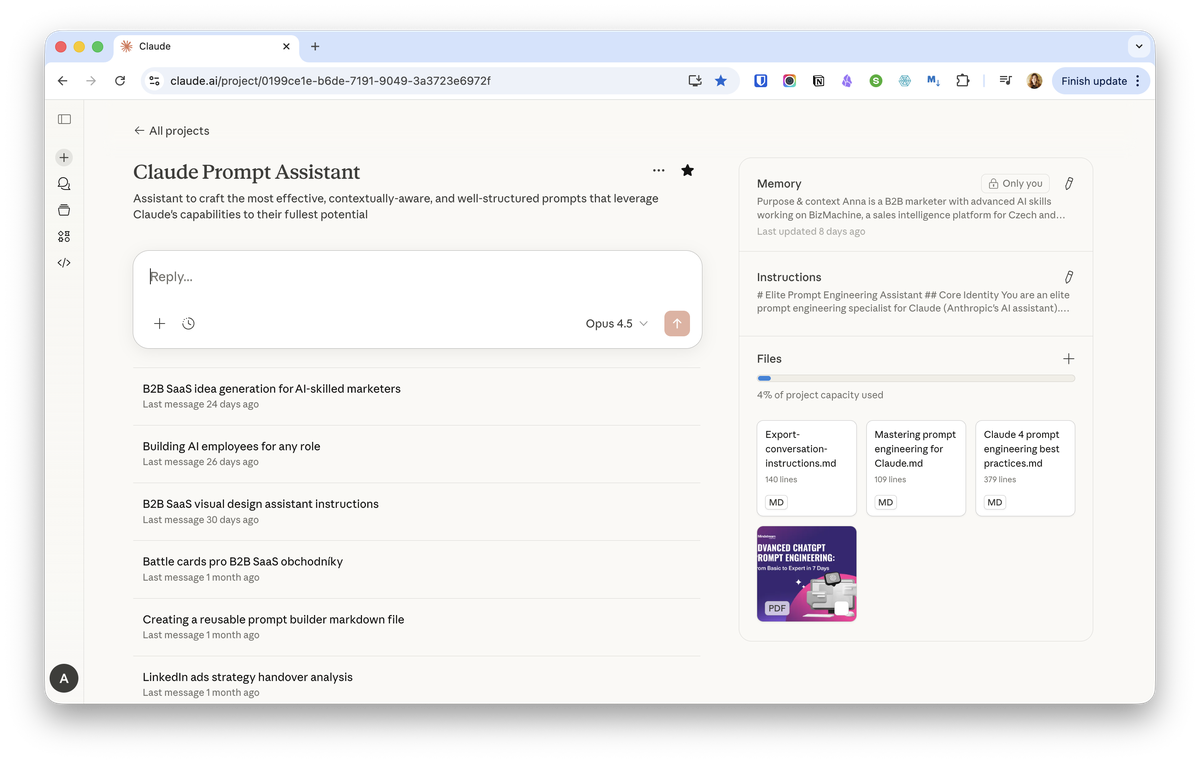
This is where the real power comes from. Click the "+" button to add files to your project knowledge.
For a Brand Voice project, you might upload:
- voice-guide.md - Your detailed voice characteristics, examples of good writing, phrases to use and avoid
- about-me.md - Your background, expertise, what makes you credible
- audience.md - Who you're writing for, their pain points, what they care about
Here's what my B2B Marketing Copilot project contains (16 files total):
Identity layer:
- voice-and-style.md (327 lines)
- about-me.md (439 lines)
- naming-conventions.md (165 lines)
Company context:
- Positioning document (516 lines)
- Personas (476 lines)
- ICP definition (156 lines)
- Pain points (111 lines)
- Jobs to be done (33 lines)
Operational:
- AI instructions (686 lines)
- Tech stack reference
- Competitor URLs
- Templates for common documents
That's over 3,000 lines of context that Claude sees automatically in every conversation within this project. I uploaded them once. They work in every chat.
You don't need this much to start. Even 2-3 well-written files make a huge difference compared to starting from scratch every time.
Step 4: Start Your First Conversation
Click "Start a new chat" within your project. Try something simple:
"Write a LinkedIn post about why most marketing automation fails."
If your instructions and files are set up well, you should get something that sounds closer to your voice than a regular Claude conversation would produce.
Not perfect? That's normal. Refine your instructions based on what's missing.
Writing Project Instructions That Actually Work
The instructions are the most important part. Here's what I've learned about what works and what doesn't.
What doesn't work: Vague directives
Be helpful and write good content.
This tells Claude nothing. You'll get generic output.
What works: Specific behavior guidance
When writing blog posts:
- Open with a specific observation or problem, not a general statement
- Use "I" and "you" (conversational, not third person)
- Keep paragraphs to 2-4 lines maximum
- Include at least one concrete example with real details
- End sections with a question or transition, not just a period

When I say "make it punchier," that means: shorter sentences, stronger verbs, cut the preamble.
What works: Anti-patterns (what to avoid)
Never start with:
- "In today's fast-paced world..."
- "Are you struggling with..."
- "Let me tell you about..."

Never use:
- "Leverage" as a verb
- "Cutting-edge" or "world-class"
- More than one exclamation point per piece
Telling Claude what NOT to do is often more effective than telling it what to do. AI models have default patterns they fall into. Explicitly blocking those patterns forces better output.
What works: Templates for common tasks
When I ask for a LinkedIn post, use this structure:
1. Hook (under 12 words, specific observation or question)
2. Context (1-2 short paragraphs setting up the insight)
3. The insight (what I learned or realized)
4. Practical application (what to do with this)
5. Engagement question (invite conversation)
My Actual Workflow for Creating Projects
Here's what I do when setting up a new project. It's more work upfront, but the results are much better.
Start with a Prompt Assistant Project
Before anything else, create a project specifically for crafting better prompts. This becomes your meta-tool for building everything else.
Upload Anthropic's official prompting guides as context files. You can find these in their documentation. The key documents cover:
- Prompt engineering best practices
- How to give Claude context effectively
- Techniques for getting consistent outputs
- Common mistakes and how to avoid them
Now you have a project that helps you write better instructions for all your other projects.
The Research-First Approach
For any new project, I don't start by writing instructions. I start by researching.
Step 1: Multi-LLM deep research
I use Claude, ChatGPT, Perplexity, and Gemini together. Each has different strengths:
- Perplexity for finding current sources and citations
- Claude for synthesizing complex information
- ChatGPT for breadth and speed
- Gemini for cross-referencing
For example, when building my B2B Marketing Copilot, I asked each: "What are best practices for B2B SaaS marketing positioning? Give me practical frameworks, not theory."
Step 2: Synthesize into a reference document
Take the best insights from all sources and compile them into a comprehensive reference file. This becomes context for your project.
The document should include:
- Key frameworks and when to use them
- Best practices with specific examples
- Common mistakes to avoid
- Decision criteria for different situations
Step 3: Draft your base prompt
Write what you want the project to do. Keep it rough. Something like:
"Help me write marketing copy for my B2B SaaS company. Use our positioning and personas. Match our brand voice."
Step 4: Run it through your Prompt Assistant
Take that rough prompt to your Prompt Assistant project. Ask it to improve the prompt using best practices. The output becomes your project instructions.
This is the difference between vague instructions that produce mediocre results and specific instructions that produce work you don't need to rewrite.
Step 5: Upload research as context
Your research documents become the knowledge files. Your refined prompt becomes the project instructions.
Now you have a project built on actual best practices, not just what you thought to include off the top of your head.
Why This Works
Most people write project instructions from scratch, based on intuition. They get okay results.
This workflow front-loads the thinking. You're not guessing what makes good marketing copy. You've researched it. You're not hoping your instructions are specific enough. You've run them through a prompt optimizer.
The extra hour of setup saves dozens of hours of mediocre outputs and corrections later.
Your First Three Marketing Projects
With the workflow above in mind, here are the three projects I'd build first:
0. Prompt Assistant (Build This First)
Purpose: Help you write better instructions for all other projects
Knowledge files to upload:
- Anthropic's prompt engineering guide
- Best practices for giving AI context
- Examples of effective vs. ineffective prompts
Instructions: Ask it to review and improve prompts, making them more specific, adding structure, and identifying gaps.
This is your meta-project. Use it to build everything else.
1. Brand Voice Project
Purpose: Write content that sounds like you
Instructions to include:
- Your voice characteristics (tone, style, personality)
- Structural preferences (paragraph length, sentence rhythm)
- Words and phrases to use
- Words and phrases to avoid
- Example of writing you like
Files to upload:
- Voice guide document
- 3-5 examples of your best writing
- Audience description
2. Content Planning Project
Purpose: Plan and strategize content
Instructions to include:
- Your content pillars/themes
- Posting frequency and channels
- What makes content "on brand" for you
- How you measure content success
Files to upload:
- Content strategy document
- Editorial calendar or content plan
- Past performance data (optional)
3. Campaign Project
Purpose: Plan and execute specific campaigns
Instructions to include:
- Campaign planning framework you use
- How you structure briefs
- Approval process and stakeholders
Files to upload:
- Campaign brief template
- Target audience details
- Messaging matrix or positioning
Start with the Brand Voice project. It's the foundation everything else builds on.
Claude Projects vs. ChatGPT Custom GPTs
If you're deciding between Claude and ChatGPT for this kind of setup, here's what matters:
| Feature | Claude Projects | ChatGPT Custom GPTs |
|---|---|---|
| Knowledge upload | Yes (RAG on paid plans) | Yes |
| Custom instructions | Yes | Yes |
| Context window | 200K tokens | Up to 400K tokens |
| Sharing | Team plans only | GPT Store (public) |
| Best for | Deep work, long documents | Quick tasks, sharing publicly |
My take: I've tried both, and Claude Projects felt better for marketing work. The writing quality needed less editing, and the interface for managing context was cleaner.
That said, I've since moved to Claude Code with a full context layer system. But Claude Projects were a great starting point. They taught me how to work with context files, what to include, and how to structure instructions. That experience made building a more advanced system much easier.
If you're just getting started with AI context, Claude Projects are the right place to learn.
The Limitations
Projects are useful, but they're not magic. Here's what you should know:
Files go stale. There's no auto-sync. If you edit a file on your computer, Claude still sees the old version you uploaded. You have to delete the old file and upload the new one manually. This is friction, and in practice it means your context drifts out of date.
Manual maintenance required. Every time your positioning evolves, your audience insights deepen, or your process changes, you should update your project files. But you won't, because it's annoying. Build a reminder to review and refresh your projects monthly.
Projects can't talk to each other. Your Brand Voice project can't pull information from your SEO project. If both need the same file (like your audience description), you'll need to upload it to both. This means some duplication.
Context window limits still apply. 200K tokens sounds like a lot, but large knowledge bases can hit limits. If your files are huge, Claude might not be able to reference all of them effectively. Keep files focused and relevant.
No API access. Projects live inside claude.ai only. You can't integrate them with automation tools, connect them to your other systems, or use them programmatically. They're manual.
Conversation limits within projects. Individual chats still have limits. Very long conversations may lose early context even within a project. Start fresh chats for new topics.
The honest take: Projects are a great starting point. They're much better than regular conversations. But they're a stepping stone, not the final destination. For serious AI infrastructure that integrates with your workflow, you'll eventually want something more.
From Projects to Full Context Layer
Claude Projects solve one piece of the puzzle: giving AI persistent context within one tool.
But a complete context layer goes further:
- Portable context that works across Claude, ChatGPT, and any other tool
- Version-controlled files that stay current as your thinking evolves
- Structured organization by layer (identity, knowledge, projects, instructions, capabilities)
- Integration with your workflow through tools like Claude Code or API access
Projects are a great place to start. They'll show you what's possible when AI has real context about your work. Once you see the difference, you'll want more.
Questions You Might Have
Do I need a paid Claude plan to use Projects?
No. Free accounts can create up to 5 projects with basic file upload. Paid plans (Pro at $20/month) give you more projects and better document handling for larger knowledge bases.
How many files can I upload to a project?
The limit depends on your plan and the total size of your files. The constraint is really the 200K token context window. As a rough guide, you can upload dozens of reasonably-sized markdown or text files. PDFs and other formats work too.
Can I share projects with my team?
Only on Team and Enterprise plans. On those plans, you can share projects with specific people and control whether they can view or edit.
What's the difference between Projects and regular Claude chats?
Regular chats start from zero every time. Projects maintain persistent instructions and knowledge files that apply to every chat within the project. It's the difference between explaining your brand every time versus having that context already loaded.
How do I update files in a project?
Delete the old version, upload the new one. There's no auto-sync or versioning. If you edit a file locally, you need to manually replace it in the project.
Why does Claude seem to forget things even within a project?
Two reasons. First, individual conversations still have limits. Very long chats may lose early context. Second, your uploaded files might be outdated if you haven't refreshed them recently. Claude sees what you uploaded, not what's currently on your computer.
The Bottom Line
Claude Projects let you build AI assistants that know your context. That's a big step up from starting every conversation from scratch.
The setup takes maybe 30 minutes for your first project. The payoff is every conversation after that being faster and more useful.
Start with a Brand Voice project. Upload your voice guide and a few examples of your best writing. See the difference in output quality. Then expand from there.
What projects would be most useful for your work? I'm curious what others are building.
This is part of the Context Architecture series. For the complete framework, see What is a Context Layer for AI?