To make AI write in your voice, you need to build a voice context layer: a documented guide to your style, patterns, and perspective that loads automatically into your AI tools. This isn't about better prompts. It's about building infrastructure that makes every AI interaction sound like you from the start.
I used to think the secret was the right prompt. Nope.
I'd spend 10 minutes explaining my voice to ChatGPT, get decent output, then start a new conversation the next day, and we were strangers again. Every. Single. Time.
The solution isn't a better prompt. It's treating voice as infrastructure, not a conversation trick.
Here's how to build a voice system that actually works. It's the same approach I use to run marketing at a B2B SaaS company. It took me a few iterations to get right (and I'm still refining it), but the difference is real.
The Real Reason AI Sounds Generic (It's Not the Prompts)
You've probably noticed: AI sounds the same for everyone. Helpful, professional, comprehensive, and... completely forgettable.
That's not because you're prompting wrong. It's the context problem.
Every new conversation starts from zero. ChatGPT doesn't remember that you prefer short sentences. Claude doesn't know you hate corporate jargon. Your preferences, your quirks, your voice. They reset with every chat.
This is why prompt libraries are a trap. You can have the perfect prompt for "write in my voice," but you still need to paste context every time. You're still teaching AI from scratch every day.
It's exhausting. And honestly, it's why most people give up on making AI sound like them.
The voice infrastructure most people never build:
What works isn't a better prompt. It's a documented voice guide that loads automatically into every AI conversation. Think of it as giving AI a permanent briefing on how you write, rather than explaining it fresh each time.
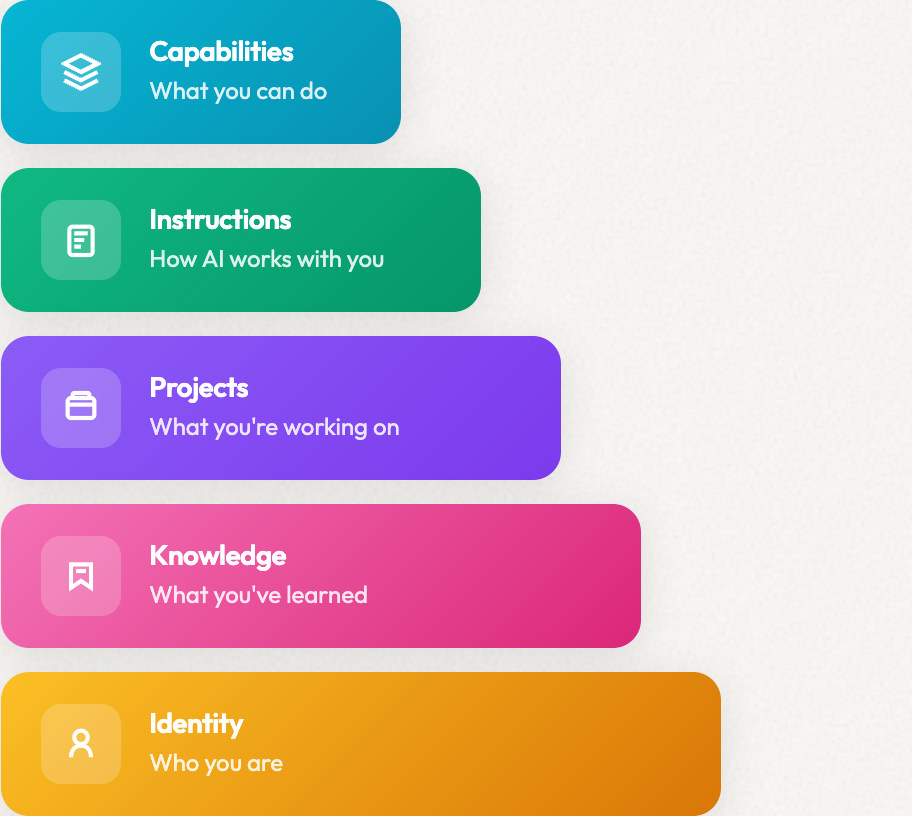
This is one of the 5 layers in what I call the "context layer": the persistent infrastructure that turns AI from a chatbot into something that actually knows you. (If you're interested in how context layers work in practice, see how I upgraded my AI's memory system.)
The Full Framework
Voice is just one of 5 layers
Your voice context sits in the Identity layer. But there are 4 more layers that make AI truly understand your work: Knowledge, Projects, Instructions, and Capabilities.
The Voice Context Layer: What You Actually Need
Your voice is more than "professional and friendly." That describes literally everyone. AI needs specifics.
The three components of a voice context layer:
- Style: Sentence length, vocabulary, punctuation habits, formatting preferences
- Perspective: How you see the world, what you believe, your stance on topics in your field
- Patterns: Phrases you use, words you avoid, how you open and close pieces
Most voice guides only cover style. But perspective is what makes writing sound like you and not just "professional." And patterns are what make AI output instantly recognizable.
What I Built: A Real Voice System
Let me show you what I actually built, because I learn best from real examples, and I suspect you do too.
At the B2B SaaS company where I'm CMO, I built a comprehensive voice system. It wasn't glamorous. I spent a weekend documenting things I'd never written down before: how we talk to customers, phrases we use, phrases we avoid, the specific way we explain complex things simply.
The honest answer? The first version was messy. Too long. Too detailed. I've refined it over months.
What the system includes:
- 600+ line Tone of Voice Guide: Brand essence, what we say and don't say, tonal pillars
- Writing Guide: Language-specific patterns, example phrases, formatting rules
- Persona-Specific Tones: Slight adjustments for different customer segments
- Quality checks: Built-in tests to catch when output drifts off-voice
The key insight: I didn't write one magic prompt. I built infrastructure (context files and guides) that load automatically. Now I don't think about voice. It's just there.
But here's what I wish someone had told me: you don't need 600 lines to start. My first working version was maybe 50 lines. Start small, add what you notice is missing.
Three techniques you can steal:
The "We Are This, Not That" exercise:
- We are: Direct and helpful, not corporate and vague
- We are: Data-informed, not data-obsessed
- We are: Practical guides, not theoretical lecturers
This gives AI clear guardrails. When it's writing and considers a corporate-sounding phrase, it has explicit guidance to avoid it.
The "Grandmother Test": If my grandmother can't understand it, rewrite it. This simplicity check is built into my voice guide, and AI applies it automatically when generating content.
The Voice Persona technique: Give your voice a name and personality. Czech brand consultant Karel Novotný does this with clients. One company created "RITA," a fictional persona who embodies their brand voice. RITA is "an inspirational guide who speaks from expertise but never lectures."
When you write as a persona, the voice becomes tangible. Instead of abstract rules ("be friendly but professional"), you can ask: "How would RITA say this?" AI handles personas well. Give it a character to inhabit, and the output becomes more consistent.
Step 1: Extract Your Voice DNA (15 minutes)
Here's where most people start wrong: they try to describe their voice instead of showing it. Don't do that.
AI is surprisingly good at pattern recognition, better than you might expect. But it needs raw material. Feed it genuine examples of your writing.
Gather 5-10 pieces of your best writing. Look for:
- Content you're proud of
- Pieces that got engagement or positive feedback
- Writing that sounds most "like you" when you read it
Mix your formats. Your voice shifts by channel. A LinkedIn post sounds different from a blog article, which sounds different from an email. Include:
- 2-3 LinkedIn posts
- 1-2 blog articles or long-form pieces
- 2-3 emails (newsletters, cold outreach, or internal)
- Website copy if you have it
If you only plan to use AI for one format (say, LinkedIn), you can focus there. But mixing formats captures more of your voice range.
The prompt to analyze your voice:
I'm going to share several examples of my writing. Analyze them and create a detailed voice profile that covers:

1. STYLE: Sentence structure, length patterns, punctuation habits, formatting preferences
2. VOCABULARY: Words I use frequently, words I seem to avoid, jargon patterns
3. PERSPECTIVE: My worldview, beliefs, and stance that come through
4. PATTERNS: How I open pieces, transition phrases, how I close, recurring expressions

Be specific. Don't say "conversational." Show me exactly what makes it conversational with examples from my writing.

Here's my writing:
[paste your samples]
Run this separately for each format if you want format-specific voice guides.
What If You Don't Have 5-10 Examples?
"I don't have much high-quality writing to analyze. What do I do?"
I hear this a lot. And here's the honest answer: you can still build a voice guide. It's just a different starting point.
The secret? Study writers you admire.
Start with who you admire:
Think about writers whose style resonates with you, even if they're in completely different fields. Maybe you love:
- The clarity of a specific newsletter writer
- How The Atlantic structures arguments
- A CEO's LinkedIn presence
- A journalist's directness
- A comedian's timing and rhythm
Your voice doesn't need to be original. Most writing voices are combinations of influences we've absorbed over time. The key is being intentional about those influences.
Use AI to research their style:
Pick 2-3 writers you admire and use AI to do deep analysis on their work. Feed it several of their pieces and ask:
Analyze this writer's style in detail:
1. What makes their sentences distinctive?
2. What words and phrases do they use repeatedly?
3. How do they structure arguments?
4. What's their relationship with the reader?
5. What do they NEVER do?

Here are several examples of their writing:
[paste their work]
AI is excellent at pattern recognition. It can surface style elements you feel but can't articulate.
Create a "voice inspiration" document:
Combine insights from your 2-3 admired writers into a single reference. Something like:
# Voice Inspiration

## From [Writer 1]: Clarity
- Short sentences
- One idea per paragraph
- Never uses jargon without defining it

## From [Writer 2]: Tone
- Direct without being harsh
- Uses "you" frequently
- Asks rhetorical questions

## From [Writer 3]: Structure
- Opens with a bold statement
- Uses lots of examples
- Ends with a clear action
Then adapt:
This becomes your starting point. As you write more, the guide evolves from "emulating others" to "your own voice" naturally. After a few months, re-analyze your own writing. You'll find you've developed patterns that are distinctly yours.
The goal isn't to copy someone else's voice forever. It's to have a deliberate starting point instead of defaulting to generic AI output.
Step 2: Document Your Voice Guide (10 minutes)
Take the AI's analysis and turn it into a usable guide. Here's the structure:
# Voice Guide: [Your Name / Brand]

## Core Voice
[2-3 sentences describing the overall feel]

## We Are / We Are Not
- We are: [trait], not [opposite]
- We are: [trait], not [opposite]
- We are: [trait], not [opposite]

## Style Rules
- Sentence length: [short/medium/varied]
- Tone: [specific description]
- Formatting: [bullets vs paragraphs, headers, etc.]

## Words We Use
[List 10-15 words or phrases that are distinctly yours]

## Words We Avoid
[List words that don't fit your voice]

## Opening Patterns
[How you typically start pieces]

## Closing Patterns
[How you typically end pieces]

## Example Phrases
"[Phrase 1]"
"[Phrase 2]"
"[Phrase 3]"
This doesn't need to be long. My initial voice guide was about 200 lines. It grew over time as I noticed what worked and what didn't.
Step 3: Build Your Persistent Context
Here's where most guides stop. They give you a voice guide and say "paste it into prompts."
That defeats the entire purpose. If you're copy-pasting every conversation, you've just created a slightly more sophisticated version of the problem we're trying to solve.
The goal is to make voice automatic. No pasting. No remembering. No friction.
Where your voice guide can live (as of 2026):
| Tool | Where Voice Lives | How It Works |
|---|---|---|
| ChatGPT | Custom Instructions or Projects | Set once, applies to conversations |
| Claude | Projects | Upload your voice guide as a file |
| Claude Code | CLAUDE.md file or Skills | Text file loads automatically; skills can trigger on demand |
| Cursor | .cursorrules file | Text file in your project folder |
For ChatGPT: Go to Settings → Custom Instructions → "How would you like ChatGPT to respond?" Paste a condensed version of your voice guide (there's a character limit). See OpenAI's guide to Custom Instructions for setup details.
For Claude Projects: Create a project, upload your full voice guide as a file. Every conversation in that project has access to it. See Anthropic's Projects documentation for how to set this up.
For Claude Code / Cursor: These tools read from text files automatically. A CLAUDE.md or .cursorrules file in your project folder loads every session. If you can write a Google Doc, you can set these up. They're just text files with specific names.
Advanced: Claude Code Skills. You can also create a "skill" from your voice guide: a markdown file that lives in ~/.claude/skills/ and can be invoked with a slash command like /voice-check. Skills can even trigger automatically when you're writing content. This is how I built a voice review step into my workflow: Claude applies my voice guide before finalizing any draft.
The key: once you set this up, you stop thinking about voice. You open a conversation, start working, and the output already sounds like you.
Step 4: Test and Refine
Your first voice guide won't be perfect. Mine wasn't. That's fine. This is iterative work.
Define what "correct" looks like first. Before testing, write down 3-5 specific criteria for good output. Not vague things like "sounds like me," but specific things you can check:
- "Opens with a direct statement, not a question"
- "No sentences longer than 20 words"
- "Uses 'you' more than 'we'"
- "Avoids words like 'leverage,' 'utilize,' 'streamline'"
This gives you something to measure against, rather than just a gut feeling.
The "recognition test": Generate a few pieces of content with your voice guide loaded. Then ask yourself: does this sound like something I would write? If you couldn't tell the difference between AI output and your own writing, you're close.
Common failure modes:
| Problem | Fix |
|---|---|
| Too formal | Add more casual example phrases to your guide |
| Wrong vocabulary | Be more explicit about words to use/avoid |
| Right style, wrong perspective | Add a section on your beliefs and stance |
| Sounds like you, but generic | Add more specific examples of your patterns |
Anti-patterns to flag in your guide:
Add a "never do this" section. Common AI-isms that make content generic:
- "In today's rapidly evolving landscape..." (filler opener)
- "It's important to note that..." (throat clearing)
- Metrics without context: "40% faster" (faster than what?)
- "Best-in-class" or "industry-leading" without proof
- "Many companies" or "leading organizations" instead of specific names
- Starting every paragraph the same way
When you explicitly flag these, AI avoids them.
Update frequently at the start. After your first 5-10 uses, you'll notice gaps. Add clarifications. Add more examples. Add explicit rules for things AI keeps getting wrong.
I updated my voice guide almost daily for the first two weeks. Now I update it maybe once a month when I notice drift.
The Voice Layer in Action: Before/After
This is what we're really talking about.
Generic AI output (no voice context):
"In today's rapidly evolving digital landscape, it's more important than ever to leverage AI tools effectively. This comprehensive guide will walk you through the key strategies for optimizing your workflow."
Ugh. Corporate buzzword soup. Could have been written by anyone, or no one.
With voice context loaded:
"AI sounds the same for everyone because it starts from zero every conversation. Here's how to fix that. The exact system I use to make AI actually sound like my brand."
Same underlying model. Completely different output.
The difference? Context. That's it.
Questions You Might Have
How much writing do I need to train AI on my voice?
5-10 strong samples work well, totaling 2,000-5,000 words. Quality matters more than quantity. Include your best work across different formats (LinkedIn, blog, email) since your voice shifts by channel.
What if I don't have enough examples of my own writing?
Study writers you admire instead. Use AI to analyze 2-3 writers whose style resonates with you, even from different fields. Combine their strengths into a "voice inspiration" document, then adapt it as your starting point. Your voice will become more distinctly yours over time.
Can I use this with ChatGPT AND Claude?
Yes. The same voice guide works across tools. You're just putting it in different places: Custom Instructions for ChatGPT, Projects for Claude, text files for Claude Code or Cursor.
Do I need to be technical to use Claude Code or Cursor?
No. These tools just use simple text files. A CLAUDE.md file is literally just a text file with that name. If you can create a Google Doc, you can set up a voice file.
How often should I update my voice guide?
Frequently at the start. After every few uses, note what's working and what's not. After a few weeks, you'll only update monthly or when you notice drift.
What if my voice changes over time?
Update your guide. Your voice should evolve. Keep a few recent writing samples handy and re-run the analysis every 6-12 months.
Your Turn: Build Your Voice Layer Today
Here's the honest timeline: you can have something working in 30 minutes.
- 15 minutes: Gather 5-10 writing samples, run the analysis prompt
- 10 minutes: Document your voice guide using the template
- 5 minutes: Add it to your AI tool of choice
Will it be perfect? No. Mine wasn't. But it'll be yours, and that's the whole point.
Start with one tool. Whichever you use most. Get it working there first. Then expand.
The difference between AI that sounds generic and AI that sounds like you isn't the model. It's the context layer. Build yours today.
Once you have voice working, you can share your AI setup with your whole team, so everyone sounds consistent without the manual work.
What's been your experience with making AI sound like you? I'm curious what's worked and what hasn't.
Ready for More?
Build the complete context layer
Voice is your foundation. Now add Knowledge (what you've learned), Projects (what you're working on), Instructions (how AI collaborates with you), and Capabilities (agents that do the work).
Building context that compounds.