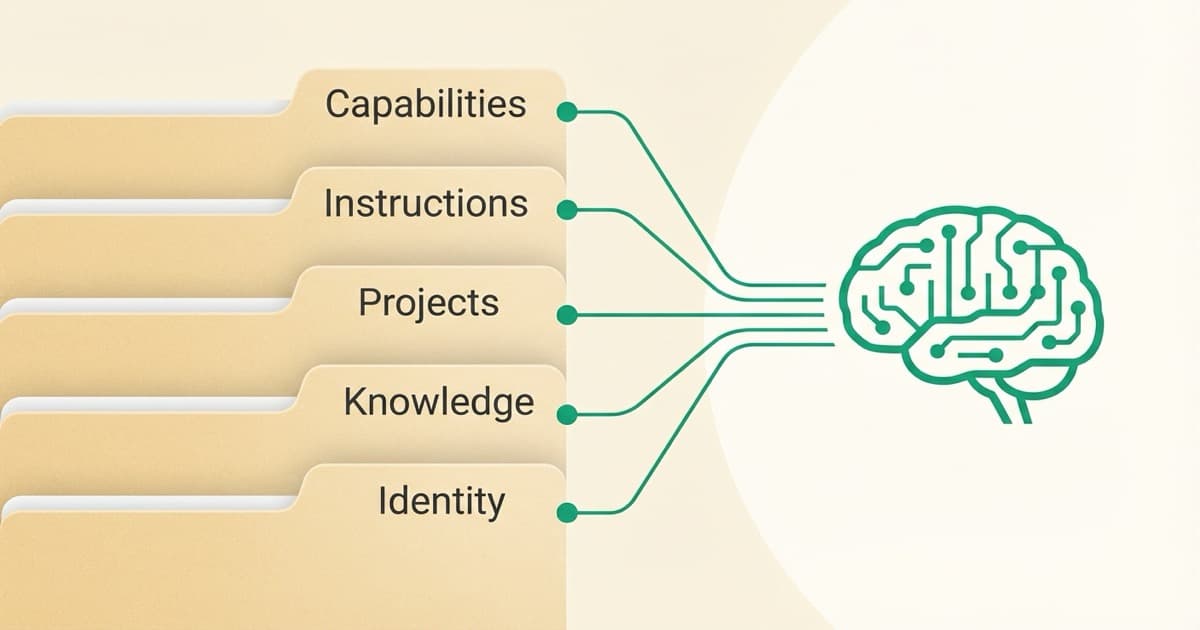
A context layer for AI is a structured system of files, instructions, and accumulated knowledge that gives your AI tools persistent memory of who you are, what you do, and how you work. You stop starting every conversation from scratch.
For marketers, this means AI that remembers your brand voice, understands your audience, and knows your workflows. Instead of re-explaining everything in every session, you build it once and the AI gets smarter over time.
If you've ever felt like you're teaching ChatGPT the same things over and over, or wondered why enterprise teams get better AI results than you do, this is the missing piece.
In this guide, you'll learn:
- What a context layer actually is (and how it's different from just "prompting better")
- Why enterprises spend millions on this while most marketers are still winging it
- The 5-layer framework that makes it practical for individuals
- How to build your first context layer in under an hour
Here's what I've learned after building this for the past year, and what I wish someone had told me when I started.
Why Is Everyone Talking About Context Layers?
The AI industry is obsessed with context right now. Anthropic publishes research on "context engineering." Google's building "context windows" into every model. OpenAI's added memory features to ChatGPT. Some are even calling it "the biggest battle in AI."
The terminology is shifting too. Andrej Karpathy, former AI leader at Tesla and OpenAI, put it this way:
"Context engineering is the delicate art and science of filling the context window with just the right information for the next step."
Why is everyone suddenly talking about this?
Because they've figured out what most users haven't: the difference between AI that helps and AI that frustrates isn't the model. It's the context you give it.
When you ask ChatGPT "write me an email," it has no idea:
- Who you are
- Who you're emailing
- What your brand sounds like
- What you've already sent them
- What outcome you want
So it gives you... generic slop. And you spend 20 minutes rewriting it into something that sounds like you.
Now imagine if ChatGPT knew all of that already. Every email would be 80% done before you start. That's what a context layer does.
The Enterprise Secret
Here's something interesting: enterprise teams at Snowflake, Databricks, and Fortune 500 companies are building "context layers" as core infrastructure for their AI systems. They're spending millions on what they call "context engineering."
But their version looks like this: vector databases, knowledge graphs, semantic layers, retrieval pipelines...
If that made your eyes glaze over, you're not alone. That's enterprise-speak for a simple idea: give AI the right information at the right time.
The good news? You don't need a data engineering team to build a context layer. You just need to know what goes in it and how to organize it.
Go Deeper
This guide gives you the overview. The course gives you the system.
Each layer has specific techniques, templates, and patterns that take hours to figure out on your own. The ContextLayer course walks you through building each one, with examples and exercises.
What is a Context Layer? The Simple Explanation
Think of a context layer as the briefing folder you'd give a new hire on day one.
When someone joins your team, you don't expect them to figure out your brand voice by reading tea leaves. You give them:
- Your brand guidelines
- Examples of past campaigns
- Information about your audience
- How you like things done
- What you're currently working on
A context layer is that same briefing folder, built for AI.
Instead of a physical folder, it's a collection of structured files that you can load into AI tools. The AI reads them, and suddenly it has context. It knows your brand. It knows your preferences. It knows what you're working on.
The Technical Definition
If you want the fancy version: a context layer is the architectural component responsible for acquiring, organizing, and delivering relevant information to AI systems when they need it.
That definition comes from enterprise AI teams who've been building these systems for years. The concept isn't new. We're just finally bringing it to individual users.
What a Context Layer Is NOT
Before we go further, let me clear up some confusion:
It's not just "better prompts." Prompts are one-time instructions. A context layer is persistent infrastructure that lives across sessions.
It's not a single document. It's a system of files organized by purpose. Some you load every time. Some only when relevant.
It's not the same as "AI memory." ChatGPT's memory feature stores random facts. A context layer is intentionally structured to make AI useful for specific work.
It's not something you set up once and forget. It's a living system that evolves as your business evolves.
The Portability Advantage
Here's what makes a context layer different from just using ChatGPT's memory or building prompts inside one tool: it's portable.
Your context layer lives as files on your computer or in the cloud. You own it. You can load it into Claude today, ChatGPT tomorrow, and whatever model is best next month. You're not locked into one vendor's ecosystem or dependent on their memory features working the way you need.
This matters because:
- Models change. Claude might be better for long-form content; GPT might be better for code. Your context layer works with both.
- Tools change. You might use ChatGPT for quick tasks, Cursor for coding, and Claude Projects for deep work. Same context, different interfaces.
- Vendors change. If OpenAI doubles their prices or Anthropic releases something better, you can switch without rebuilding everything.
Building your context as structured files instead of relying on built-in AI memory means you're building infrastructure you control, not renting someone else's.
Why Your AI Keeps Forgetting (And Getting It Wrong)
Let's talk about the problem a context layer solves.
The Context Window Trap
Every AI model has a "context window": the amount of information it can hold in working memory at once. Claude can hold about 200,000 tokens. GPT-4 holds 128,000.
Sounds like a lot, right?
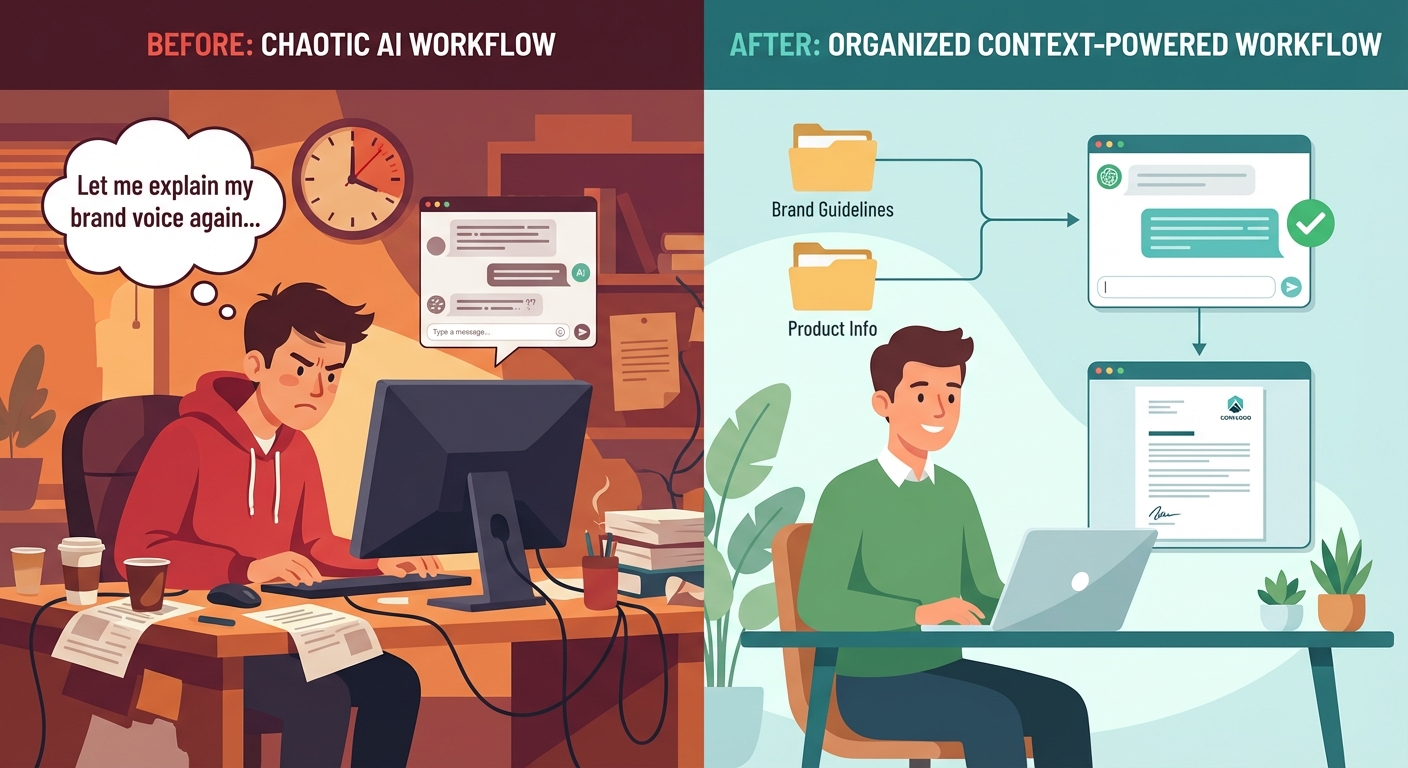
The problem: that context window resets every conversation. Everything you taught the AI last week? Gone. The nuances about your brand voice you spent 20 minutes explaining? Forgotten.
This is why you feel like you're starting over every session.
The Real Cost
I used to spend the first 3-5 minutes of every ChatGPT session re-explaining who I am and what I need. It was exhausting. And a little embarrassing. I'm supposed to be good at this stuff, and I was still fighting the tool daily. Multiply that by multiple sessions per day, and you're looking at hours per week. Just teaching AI the same things over and over.
Even when you re-explain, you probably forget something. So the AI's outputs are inconsistent. One day it nails your brand voice. The next day it sounds like a corporate press release.
That inconsistency isn't the AI's fault. It's a context problem. (I wrote about how I finally solved this after months of frustration.)
The Enterprise Advantage
Enterprise teams don't have this problem. They build systems that automatically feed relevant context to AI before every query. The AI always knows what it needs to know.
Until now, individuals had no way to do this. You either had to be a developer or settle for the generic experience.
That's what we're fixing.
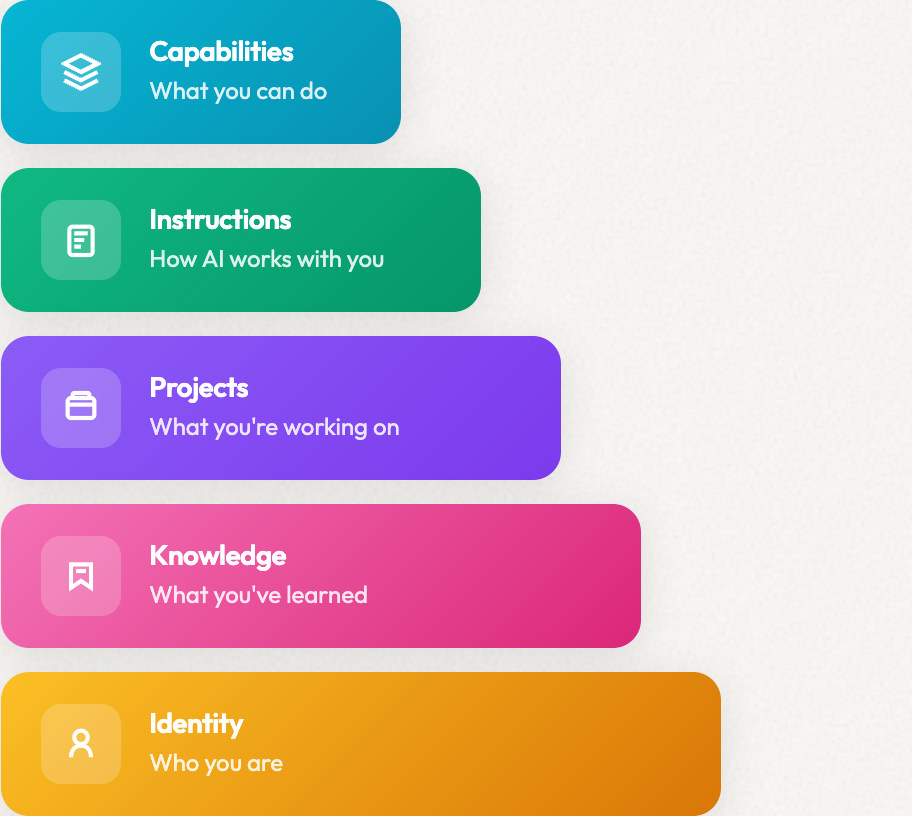
What Are the 5 Layers of a Context Architecture?
After months of building, testing, and a lot of false starts, I've landed on a 5-layer framework that works for marketers. My first attempts were a mess: too complicated, too much in one place. This is the version that actually stuck.
Here's the stack, from foundation to execution:
Layer 1: Identity — Who You Are
What it contains: Your brand voice, positioning, values, communication style, and personal background.
Why it matters: AI can only write in your voice if it knows your voice. This layer is the foundation that shapes every output.
What goes in it:
- Brand voice guide (how you sound)
- Positioning statement (what you stand for)
- About me / company background
- Communication preferences (formal vs. casual, emoji use, etc.)
Example files:
identity/
├── brand-voice.md
├── positioning.md
├── about-me.md
└── communication-style.md
Without this layer, you get generic AI. With it, you get AI that sounds like you.
Layer 2: Knowledge — What You've Learned
What it contains: Your accumulated expertise, frameworks, domain knowledge, and lessons learned.
Why it matters: AI can only apply your methods if it knows your methods. This layer turns AI into a specialist in your specific domain.
What goes in it:
- Best practices you've developed
- Frameworks you use (like marketing models)
- Industry-specific knowledge
- Lessons learned from past projects
- Templates and examples
Example files:
knowledge/
├── email-marketing-best-practices.md
├── icp-research.md
├── competitor-analysis.md
├── lessons-learned.md
└── templates/
This is where your expertise lives. The AI learns from your experience, not just generic internet knowledge.
Layer 3: Projects — What You're Working On
What it contains: Active campaigns, current goals, target accounts, and ongoing initiatives.
Why it matters: AI can only help with your work if it knows what you're working on. This layer provides immediate, relevant context.
What goes in it:
- Active campaign briefs
- Current quarter goals
- Target account profiles
- Content calendar
- Project-specific context
Example files:
projects/
├── q1-2026-goals.md
├── active-campaigns/
├── target-accounts/
└── content-calendar.md
This layer changes frequently — that's the point. It keeps AI current on what matters now.
Layer 4: Instructions — How AI Works With You
What it contains: Rules for AI behavior, preferences for outputs, workflow patterns, and working agreements.
Why it matters: AI can only follow your preferences if you've documented them. This layer shapes how AI thinks and responds.
What goes in it:
- General working instructions (CLAUDE.md style files)
- Output format preferences
- Decision rules ("always ask before doing X")
- Workflow patterns
- Quality standards
Example files:
instructions/
├── CLAUDE.md
├── output-preferences.md
├── quality-standards.md
└── workflow-rules.md
This is where you encode "how you like things done." The AI learns to work with you, not just for you.
Layer 5: Capabilities — What You Can Do
What it contains: Skills the AI can perform, tools it can use, actions it can take on your behalf.
Why it matters: This layer turns AI from a chatbot into an agent that can actually do things.
What goes in it:
- Skill definitions (specific tasks AI can perform)
- Tool integrations (what systems AI can access)
- Action templates (pre-built workflows)
- Agent configurations (specialized AI "employees")
Example files:
capabilities/
├── skills/
│   ├── write-email.md
│   ├── research-competitor.md
│   └── generate-report.md
├── agents/
└── tools/
This is the most advanced layer. You might not need it on day one, but it's where the real power comes from.
How the Layers Stack
The layers build on each other:
┌─────────────────────────┐
│     Capabilities        │  What you can do
├─────────────────────────┤
│     Instructions        │  How AI works with you
├─────────────────────────┤
│       Projects          │  What you're working on
├─────────────────────────┤
│      Knowledge          │  What you've learned
├─────────────────────────┤
│       Identity          │  Who you are
└─────────────────────────┘
Identity is the foundation. Everything else builds on it. You can start with just the bottom two layers and add the rest as you need them.
How to Build Your Context Layer: Getting Started
You don't need to build all five layers on day one. Here's how to start small and expand over time.
The 30-Minute Starter Setup
Step 1: Create your Identity layer (15 minutes)
Create a single file that captures:
- Who you are (2-3 sentences)
- What your brand sounds like (with 3-5 examples)
- Your communication preferences
This doesn't need to be perfect. Start simple:
# About Me

I'm Anna. I lead marketing at a B2B SaaS company. We sell data
products to enterprise sales teams in Czech Republic.

## How I Sound

Direct and practical. I avoid corporate jargon. I use
specific numbers over vague claims. I'm honest about
tradeoffs. Nothing is perfect.

## Examples of My Voice

GOOD: "This saves 10 hours per month on lead research."
BAD: "Our cutting-edge solution revolutionizes workflows."

GOOD: "Claude is better for long-form content. Here's why."
BAD: "In today's rapidly evolving AI landscape..."
Step 2: Create one Knowledge file (10 minutes)
Pick the thing you explain most often. For most marketers, it's their ICP. Write it down once:
# Our ICP (Ideal Customer Profile)

## Who We Sell To

Marketing directors at B2B SaaS companies (100-1000 employees)
who are currently doing content marketing manually or with
junior writers who don't understand the product.

## Pain Points

1. Content takes too long: 8+ hours per blog post
2. Writers don't understand technical products
3. SEO content sounds generic and doesn't convert

## What They Care About

- Speed (they have aggressive content targets)
- Quality (needs to sound like an expert, not a generalist)
- Results they can show leadership (traffic, leads, pipeline)
Step 3: Load them into your AI tool (5 minutes)
Every major AI tool now has a way to add context:
- Claude: Upload to Projects or add to your prompt
- ChatGPT: Add to custom instructions or upload to a GPT
- Cursor: Add to your .cursorrules file
Once loaded, test it. Ask the AI to write something for you. It should sound different — more like you, less like generic AI.
Week Two: Add Projects and Instructions
Once the basics work, add:
Projects layer: What are you actively working on? Create a file for each major initiative.
Instructions layer: What rules should AI follow? Start with a CLAUDE.md-style file that captures your preferences.
Month One: Build Out Capabilities
Once you're comfortable, start building:
- Reusable skill templates
- Specialized agents for specific tasks
- Tool integrations
This is where the real power comes from. But don't rush it. Get the foundations right first.
Context Layer vs. Second Brain vs. AI Memory
You might be wondering how this relates to other concepts you've heard. Let me break it down.
Second Brain
A "second brain" (popularized by Tiago Forte) is a personal knowledge management system. It's great for capturing and organizing information.
The difference: A second brain is primarily for humans. A context layer is structured for AI consumption. They can overlap. Your second brain might feed your context layer. But the design goals are different.
ChatGPT Memory / Claude Memory
Built-in AI memory features automatically store facts from your conversations.
The difference: These are passive and automatic. A context layer is intentional and structured. Memory captures what you mention; a context layer captures what matters.
RAG (Retrieval-Augmented Generation)
RAG is a technical approach where AI retrieves relevant documents before generating responses. It's what enterprise context layers use under the hood.
The difference: RAG is the mechanism. A context layer is the system you build on top of it. You don't need to understand RAG to build a context layer.
Summary Comparison
| Concept | Purpose | For Whom | Structure |
|---|---|---|---|
| Second Brain | Personal knowledge management | Humans | Flexible, personal |
| AI Memory | Remember conversation facts | AI | Automatic, passive |
| RAG | Retrieve relevant docs | Developers | Technical, pipeline |
| Context Layer | Make AI useful for your work | You + AI | Intentional, layered |
A context layer isn't replacing any of these. It's the system that ties them together for practical use.
Real Examples: Context Layer in Action
Let me show you what this looks like in practice.
Example 1: Writing a LinkedIn Post
Without context layer:
You: "Write a LinkedIn post about AI for marketers."
AI: "🚀 AI is revolutionizing marketing! Here are 5 ways to leverage artificial intelligence for your brand..."
Generic, sounds like everyone else, uses language I'd never use.
With context layer:
The AI has loaded my Identity layer. It knows my voice, my positioning, and what I actually talk about.
Same prompt gets:
"I used to think the secret was the right prompt.
After building 15+ AI workflows at my company, I realized I was wrong.
The difference between AI that helps and AI that frustrates isn't the model. It's the context you give it.
Here's what I mean..."
Sounds like me. No hype. Leads with insight, not announcement.
Example 2: Responding to a Prospect
Without context layer:
You need to respond to a demo request. You paste in the email, explain your product, describe your ICP...
10 minutes of context-setting before AI can help.
With context layer:
My Projects layer has current campaigns and target accounts. My Knowledge layer has objection handling and ICP details.
I just paste the email and say "draft a response."
The AI knows:
- Who we are
- Who we're talking to
- What matters to them
- How we sound
First draft is 90% usable.
Example 3: Building a Campaign Brief
Without context layer:
You create a brief from scratch every time, hoping you don't forget anything important.
With context layer:
My Capabilities layer has a "create-campaign-brief" skill that pulls from:
- Current quarter goals (Projects)
- ICP and pain points (Knowledge)
- Brand positioning (Identity)
- Brief template (Knowledge)
I describe the campaign. AI generates a complete brief that's already aligned with everything else we're doing.
Common Mistakes (And How to Avoid Them)
I've made all of these. Multiple times. Here's what I learned the hard way so you don't have to.
Mistake 1: Trying to Build Everything at Once
The temptation is to create a perfect, comprehensive context layer before using it. Don't. I tried this. Spent a weekend building an elaborate system that I never actually used because it was too complicated.
What worked for me: Start with Identity and one Knowledge file. Use them for a week. Add more only when you feel the need.
Mistake 2: Making Files Too Long
Longer isn't better. AI attention has limits, and bloated files dilute what matters.
What worked for me: Keep individual files focused. 500-1000 words is usually plenty. Split big topics into multiple files.
Mistake 3: Never Updating
A context layer isn't "set it and forget it." Outdated context is worse than no context.
What worked for me: Review your Projects layer weekly. Update Knowledge when you learn something important. Build updating into your workflow.
Mistake 4: Forgetting to Actually Load It
The best context layer in the world is useless if you forget to use it.
What worked for me: Create loading habits. Use Claude Projects that pre-load context. Build loading into your templates.
Questions You Might Have
What is a context layer in simple terms?
A context layer is the organized collection of files and instructions that give AI persistent knowledge about you, your work, and your preferences. It's like giving AI a comprehensive briefing so it can actually help instead of asking you to explain everything every time.
How is a context layer different from ChatGPT's memory?
ChatGPT's memory passively stores facts you mention in conversations. A context layer is intentionally structured for specific purposes. You have a knowledge layer for your expertise and an identity layer for your brand voice. Memory is automatic and general; a context layer is purposeful and organized.
Do I need to be technical to build a context layer?
No. A context layer is just markdown files organized in folders. If you can write a document and create a folder, you can build a context layer. The 5-layer framework gives you structure; the content is just your knowledge written down.
How long does it take to set up a basic context layer?
You can have a working starter context layer in 30 minutes. Identity layer plus one Knowledge file is enough to see the difference. From there, you add layers as you need them. Most people build over weeks, not days.
What tools do I need for a context layer?
You need a way to write markdown files (any text editor), a place to store them (folders on your computer or cloud storage), and an AI tool that accepts context (Claude, ChatGPT, Cursor, etc.). No special software required.
Is building a context layer worth the time investment?
If you use AI regularly for work, yes. I estimate my context layer saves 5-10 hours per week in re-explaining, rewriting, and redoing work. The 30-minute starter setup pays for itself in the first session.
Summary: Context Layer at a Glance
| Aspect | Key Point |
|---|---|
| Definition | A structured system of files that gives AI persistent knowledge about you and your work |
| Purpose | Stop re-explaining everything; get consistent, useful AI outputs |
| The 5 Layers | Identity → Knowledge → Projects → Instructions → Capabilities |
| Time to start | 30 minutes for a working starter setup |
| Best for | Marketers, creators, and professionals who use AI daily |
The enterprise world figured this out years ago. They just wrapped it in jargon and made it complicated.
You don't need a data engineering team. You need a folder of well-organized files and a system for loading them.
That's a context layer. And now you know how to build one.
I'm curious: have you tried building something like this? What's worked? What hasn't? I'm still learning and refining my own system, and I'd love to hear what you're discovering.
Ready for More?
Build the complete context layer
This guide covered the fundamentals. Now add Knowledge (what you've learned), Projects (what you're working on), Instructions (how AI collaborates with you), and Capabilities (agents that do the work). The full ContextLayer methodology shows you how.
Building context that compounds.